Activate widget
everywhere
Enable ZodiacInsights to access your daily horoscope and celestial insights with a single click on supported websites.

Learn how to use every feature—from tracking progress to
saving notes—in just a few simple steps.
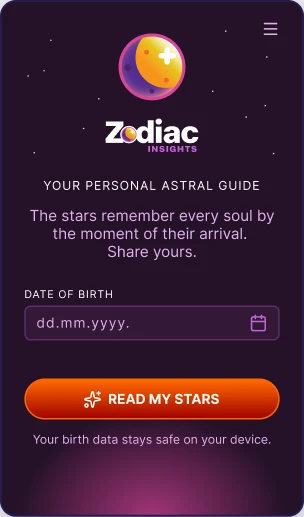
Getting started
When you open ZodiacInsights for the first time you will see this screen. Type your date of birth into the field — day, month, year — and tap Read My Stars.
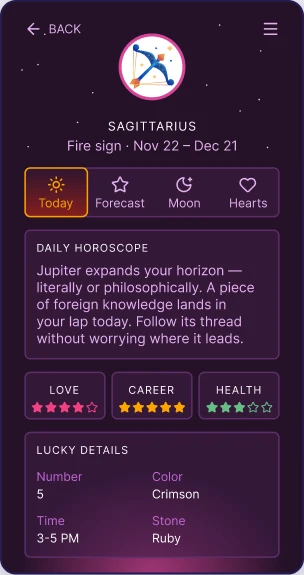
Today tab
The Today tab gives you a personalised daily horoscope, love, career, and health ratings, plus your lucky number, colour, time, and gemstone.
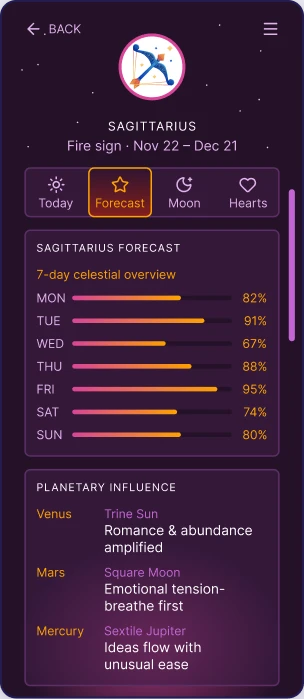
Forecast tab
Tap Forecast to view your 7-day celestial forecast with daily energy bars and easy-to-understand planetary influences.
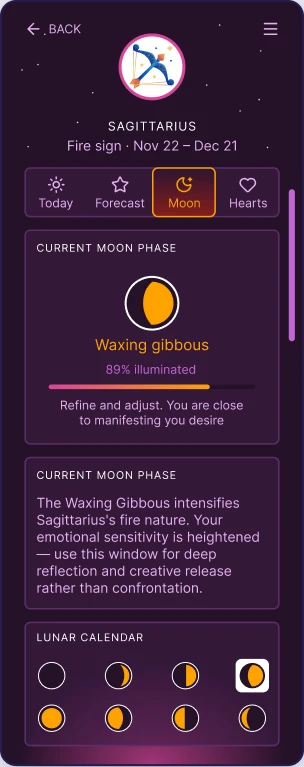
Moon tab
The Moon tab shows the current lunar phase, illumination, and a personalised interpretation of how it influences your sign. Browse the full 8-phase lunar cycle below.
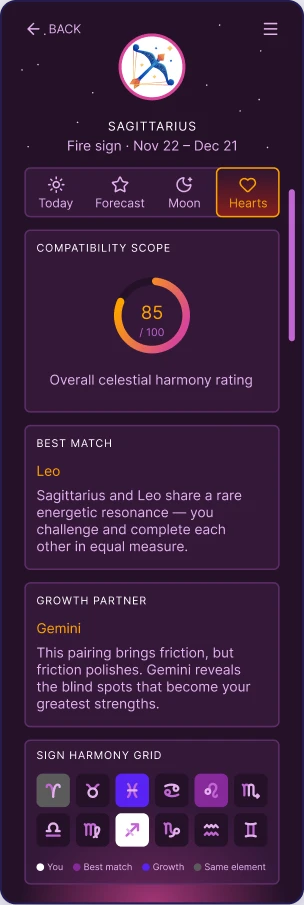
Hearts tab
The Hearts tab shows your compatibility score, your best romantic match, and the sign that helps you grow. Explore the full 12-sign compatibility chart below.
Customize your experience, manage settings, and access
helpful tools in one place.
Enable ZodiacInsights to access your daily horoscope and celestial insights with a single click on supported websites.
Learn how to use the ZodiacInsights widget, from opening your daily view to exploring every feature.
Your feedback helps make ZodiacInsights even better.